UDISE Plus 2026-27 Login Guide | Student, Teacher & All Modules

📋 Table of Contents (click to collapse)
What is UDISE Plus Login?
UDISE Plus Login is the way schools, teachers, and education officers access the official government education portal. The full name is Unified District Information System for Education Plus, run by the Ministry of Education, Government of India.
Through this portal, schools enter data about students, teachers, and school infrastructure every year. This data is used by the government to plan education budgets, allocate teachers, and run schemes like mid-day meals and scholarships.
Types of Login in UDISE Plus
| Module | Who Logs In | Official URL |
|---|---|---|
| Student Module (SDMS) | School Staff / Headmaster | sdms.udiseplus.gov.in |
| Teacher Module | Teacher / School Admin | udiseplus.gov.in/udiseteacher/ |
| School Profile Module | Headmaster / Principal | udiseplus.gov.in/moe_udise/ |
| Report Module | School / Block / District | udiseplus.gov.in/udisereport/ |
| School Directory / User Mgmt | Block / District Admin | udiseplus.gov.in/ud/ |
| All Modules (State Login) | All School Staff | udiseplus.gov.in/#/en/page/statelogin |
UDISE Plus Main Portal Login – Step by Step
- Open your browser and type udiseplus.gov.in - press Enter
- The UDISE Plus home page will open
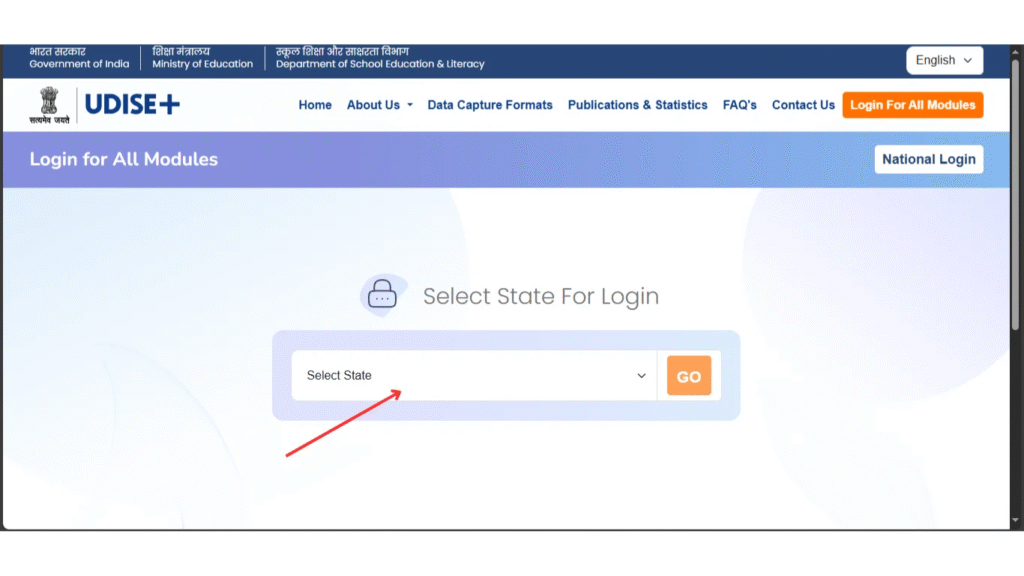
- Click on "Login for All Modules" button
- A page will open showing a map of India - select your state or UT
- Click "Go" button
- Your state's UDISE+ portal will open with all module options
- Select the module you want to access
- Enter UDISE Code (username), password, and captcha
- Click Login
UDISE Plus Student Module Login
The Student Module login is done through the SDMS portal. This is where schools enter student data like name, class, Aadhaar, and APAAR ID.
- Go to sdms.udiseplus.gov.in or select Student Module from the state portal
- Enter your school's 11-digit UDISE code as username
- Enter your password
- Fill in the captcha code
- Click Login to access the student dashboard
UDISE Plus Teacher Module Login
The Teacher Module is where individual teachers can update their personal and professional information.
- Go to udiseplus.gov.in/udiseteacher/
- Enter your Teacher ID (provided by school or education department)
- Enter your password
- Enter captcha and click Login
- Update your profile, service record, and qualification details
UDISE Plus School Profile Login
The School Profile Module is where schools update their infrastructure, facilities, and enrollment data.
- Go to udiseplus.gov.in/moe_udise/
- Enter your school's UDISE code
- Enter the password given by Block MIS Coordinator
- Enter captcha and click Login
- Fill in school infrastructure, toilets, classrooms, internet, computer lab data

Forgot Password – How to Reset
If you forgot your UDISE Plus password, here is what you can do:
- Go to the UDISE Plus login page
- Look for the "Forgot Password" link (if available)
- Enter your UDISE code and registered mobile number
- An OTP will be sent - enter it to reset your password
- If the option is not available, contact your Block MIS Coordinator directly - they can reset the password for you
Tips for Smooth Login Experience
- ✅ Always use Google Chrome browser - latest version
- ✅ Login in the morning hours (before 10 AM) when server load is low
- ✅ Check Caps Lock is OFF before entering password
- ✅ Clear browser cache and cookies if login is not working
- ✅ Use a stable internet connection - avoid mobile data for data entry
- ✅ Logout properly after each session
- ✅ Keep a note of your UDISE code and contact number of Block MIS Coordinator
❓ Frequently Asked Questions (FAQs)
Here are the most common questions people ask about UDISE Plus 2026-27 Login Guide | Student, Teacher & All Modules.
✅ Conclusion
Logging into UDISE Plus 2026-27 is easy once you know the right steps. Always use the official website udiseplus.gov.in or sdms.udiseplus.gov.in. Keep your UDISE code and password safe. If you face any login problem, contact your Block MIS Coordinator. Timely login and data entry helps your school get the right resources from the government.