How to Find UDISE Code 2026-27 – Step by Step Guide

📋 Table of Contents (click to collapse)
- Why You Need Your UDISE Code
- Step-by-Step: Find UDISE Code on UDISE Plus Portal
- Find UDISE Code Using Report Module
- Find UDISE Code from Official Documents
- Find UDISE Code by Contacting BEO
- How to Search If You Only Know School Name
- What to Do If Your School Is Not Found
- Save and Remember Your UDISE Code
- Frequently Asked Questions (FAQs)
Why You Need Your UDISE Code
Your school's UDISE code is its official 11-digit ID in the national education system. You need it for:
- Logging in to UDISE+ portal (it is your username)
- Filling government grant applications
- School inspection paperwork
- Mid-day meal and scholarship records
- Transfer certificates for students
If you don't know your UDISE code, don't worry. This guide will show you exactly how to find it in just a few steps.
Step-by-Step: Find UDISE Code on UDISE Plus Portal
- Open Google Chrome browser on your phone or computer
- Type udiseplus.gov.in in the address bar and press Enter
- The UDISE Plus home page will open
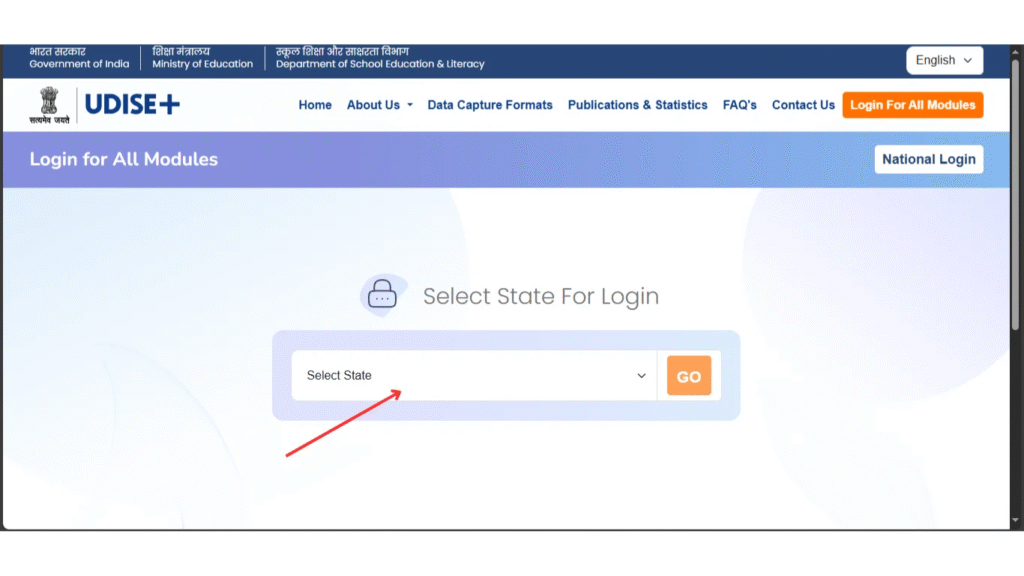
- Look for and click on "Report Module" or "School Search"
- Select your State from the dropdown list
- Select your District
- Type your school name in the search box
- Click Search button
- Your school will appear - the 11-digit UDISE code will be shown next to the school name
- Write down this code or screenshot it
Find UDISE Code Using Report Module
The Report Module also has a school search feature:
- Go to udiseplus.gov.in/udisereport/
- Click on "School Profile Report" or "School Search"
- Select State → District → Block from the dropdowns
- A list of all schools in that block will appear
- Find your school name and note its UDISE code from the list
Find UDISE Code from Official Documents
No internet? Check these school papers - the UDISE code is printed on them:
| Document | Where to Look |
|---|---|
| School Recognition Certificate | Top section - near school name |
| Annual Grant Letter (Composite Grant) | Header or subject line |
| Mid-day Meal Government Letters | School details section |
| UDISE Annual Data Form (paper) | First page - school info section |
| School Inspection Report | School identification section |
| Previous Year Login Details | If you have old login records |
Find UDISE Code by Contacting BEO
If you cannot find it online or on documents, the easiest way is to contact your Block Education Office (BEO):
- Visit your Block Education Office
- Tell them your school's name and village/town
- Ask for your school's UDISE code
- They maintain a complete list of all schools in the block with UDISE codes
- Note down the code and also ask for the Block MIS Coordinator's contact number
How to Search If You Only Know School Name
If you only know the school name (and not the district or block), here is what to do:
- Search on Google: type your school name + "UDISE code" + district name
- Or go to the UDISE Report Module, select the state, and search by name only (leave district blank if the field allows)
- Check your school's Facebook page or website - many schools display their UDISE code publicly
- Ask a teacher who has been in the school for many years - they would know the code
What to Do If Your School Is Not Found
If you searched properly but your school is not showing up, it could mean:
- School is not registered in UDISE+ - contact District Education Office for registration
- School name is different in the database - try a shorter version of the name
- Wrong state or district selected - recheck and try again
- School is very new and not yet added to the database - wait for next update cycle
Save and Remember Your UDISE Code
Once you find your school's UDISE code, save it in these places so you never lose it:
- Write it on the school's notice board
- Save it in your phone's contacts as "School UDISE Code"
- Note it in the school's main register on the first page
- Email it to yourself and your Block MIS Coordinator
- Print it on a sticker and paste inside the principal's office cupboard
❓ Frequently Asked Questions (FAQs)
Here are the most common questions people ask about How to Find UDISE Code 2026-27 – Step by Step Guide.
✅ Conclusion
Finding your UDISE code is easy when you use the right method. The fastest way is to search on the UDISE Plus portal using your school name, district, and block. If you cannot find it online, check your school's official documents or contact the Block Education Office. Once found, write it down in multiple places so you never lose it again. Your UDISE code is your school's most important identity number.